
April 23, 2026
General
How to Turn Your Broken Data Workflows Into Scalable Data Pipelines: An Ultimate Guide
Key Takeaways
Then the company grows. Diverse data sources get added. More people depend on the same datasets. Data volumes climb. Dashboards turn into operational systems. Data products start serving finance, product, customer operations, and machine learning at the same time. That is usually the point where “good enough” workflows start breaking in ways that are expensive and hard to ignore.
The data supports this. In Dataversity’s 2024 Trends in Data Management survey, 68% of respondents said data silos were one of their organization’s biggest data management challenges, and 56% pointed to data quality issues. In an Economist Impact study on AI data challenges, only 29% of organizations said their existing architecture could fully connect AI to the broader business data ecosystem. The same study found that nearly 80% of respondents saw insufficient observability and monitoring as one of the top three contributors to poor data quality. Operationally, the costs are not abstract either: Uptime Institute’s 2024 global survey found that 54% of respondents said their most recent significant outage cost more than $100,000 while 20% said it cost more than $1 million.
That is why scalable data pipelines matter. Data pipeline optimization is the difference between a data platform that can keep up with the business and one that keeps forcing teams into rework, delays, and manual fixes.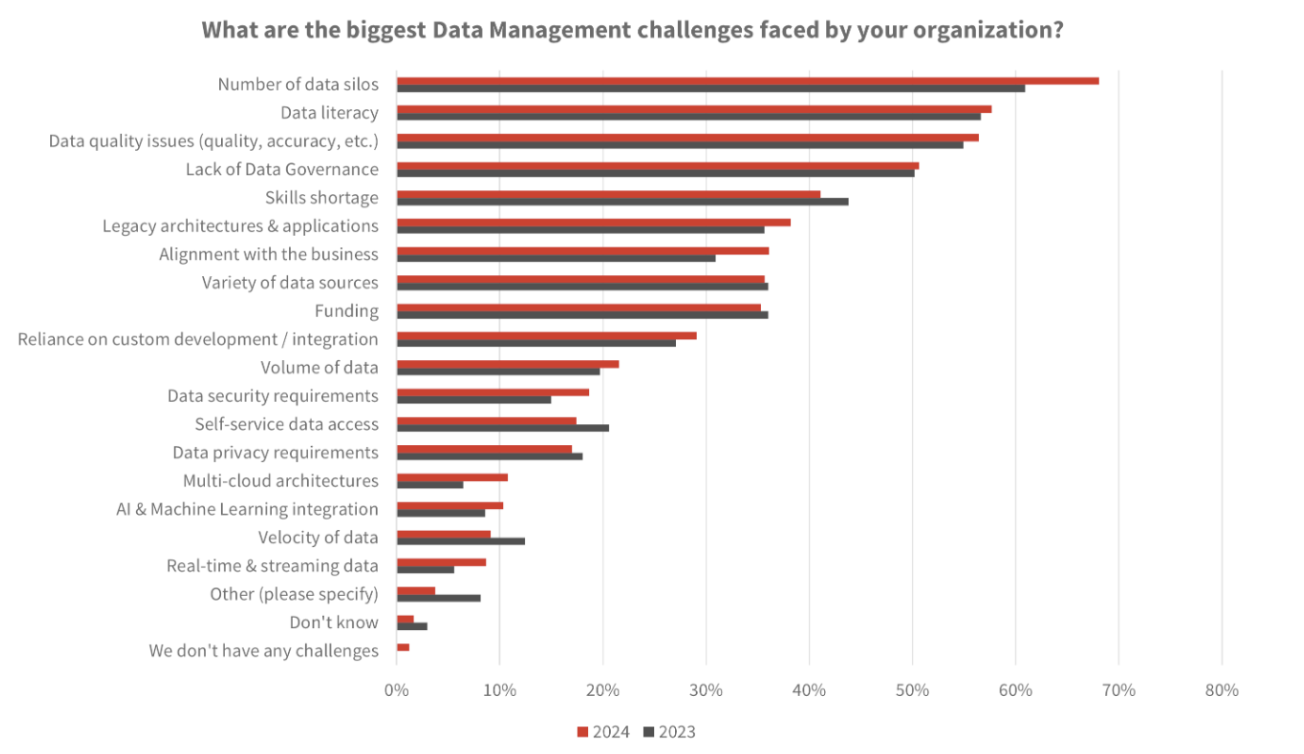 Source: Datadiversity
A separate Harvard Business Review Analytic Services report sponsored by AWS makes the same point from the AI side. Among organizations moving forward with generative AI, data issues were the top challenge in scaling it. And 52% rated their data foundation’s readiness for gen AI a five or lower on a ten-point scale. That matters because broken data processing workflows do not stay in the reporting layer anymore. They spill directly into product quality, automation, and AI outcomes, especially as large datasets become more central to operations.
In practice, the biggest failure points are usually familiar:
The most obvious failure signs include:
The cloud platforms are surprisingly aligned on the basics. AWS’s analytics guidance recommends decoupling storage from compute resources so both can scale independently. Microsoft’s Azure architecture treats orchestration, control flow, and data movement as core parts of the platform, not afterthoughts. Google Cloud’s Dataflow focuses heavily on isolation, dependency management, and reliability.
Different ecosystems, same general conclusion: scalable pipelines come from structure and operating discipline, not from hoping bigger workloads will handle growing data volumes the same as small ones.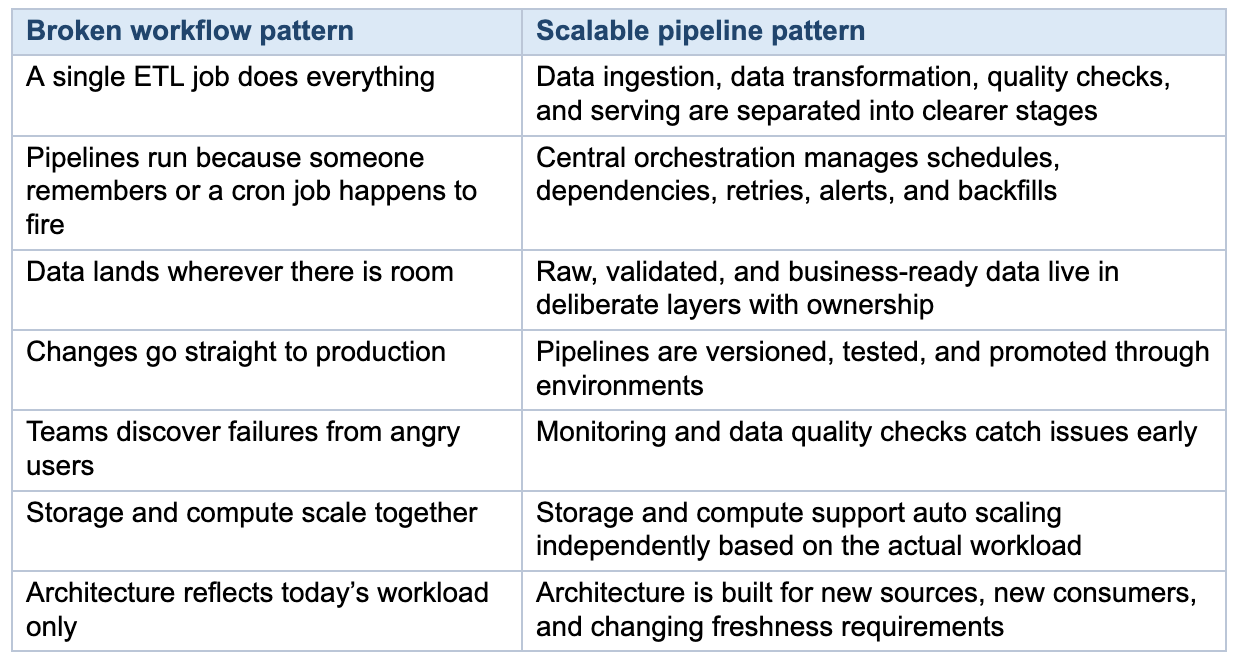
That matters even more when the same data estate has to support overnight batch processing, business-hour data analytics queries, and experiments for AI or machine learning. It is also why data warehouses and data lakes choices deserve real attention, read more on this guide for choosing a data warehouse.
That is why Kanda’s guide on CI/CD implementation aligns with this theme. Pipeline reliability is partly a data problem, but it is also a delivery problem.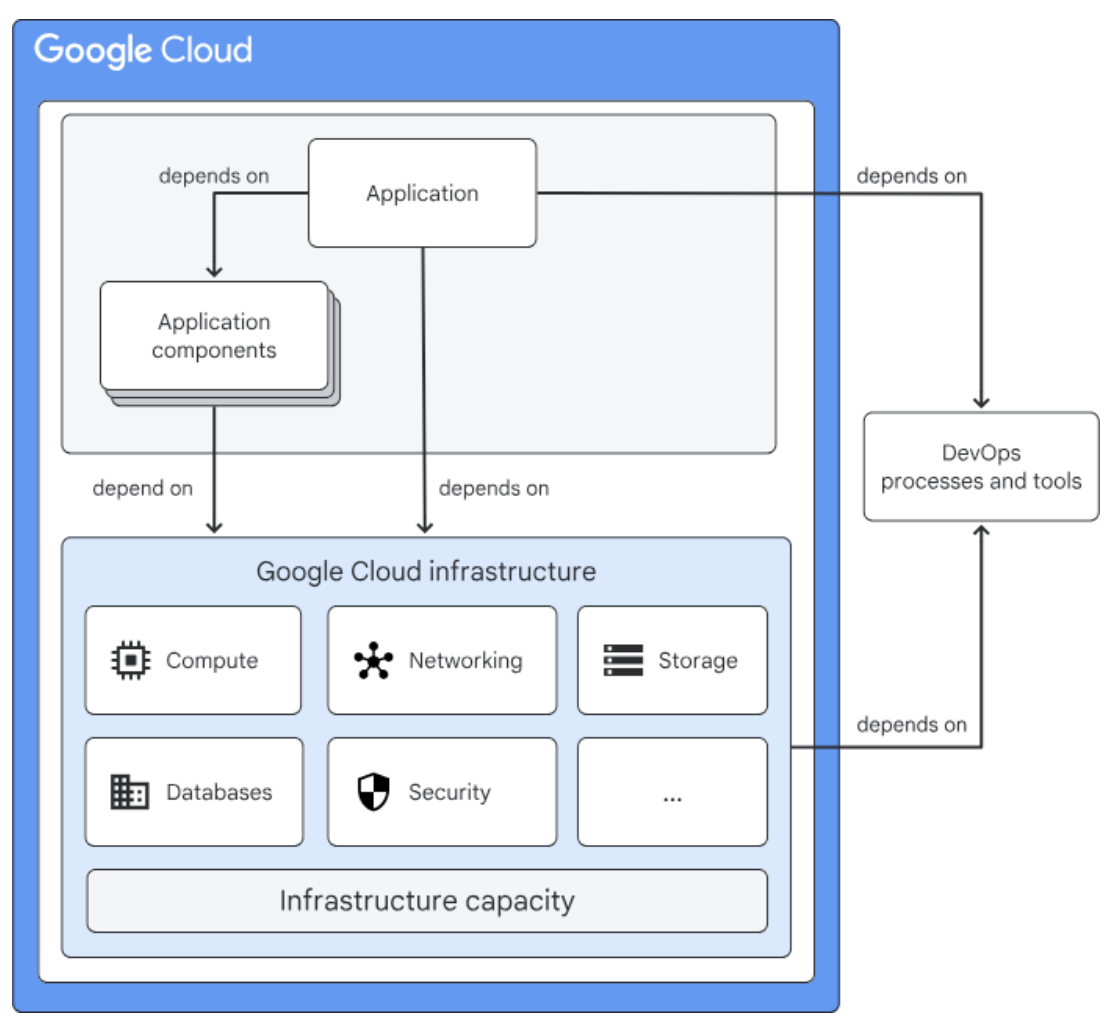
A hybrid model is often the most realistic answer for growing enterprises, especially when one part of the business needs daily data analytics while another needs operational data products with tighter service levels.
The important thing is not picking the trendiest pattern. It is making sure the architecture, observability, and ownership model are appropriate for the workload you are actually running.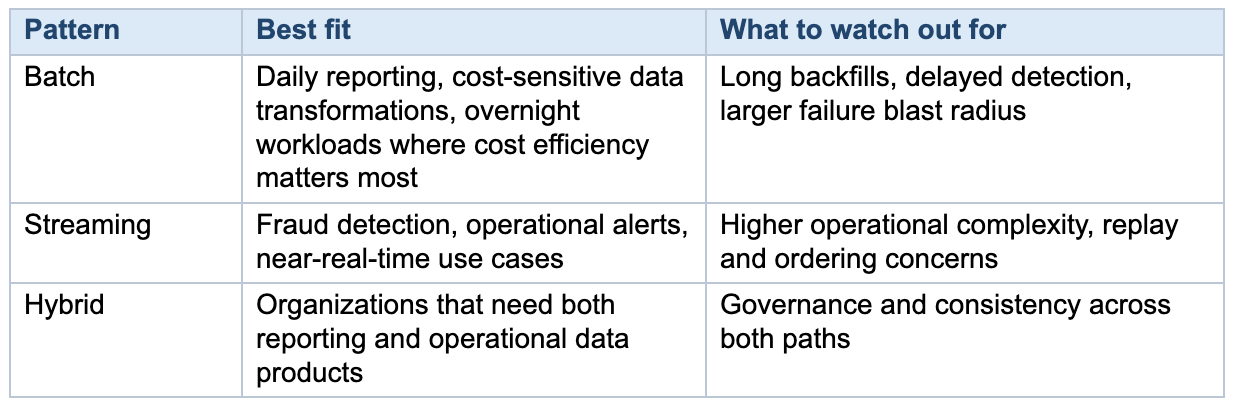
The good news is that optimizing data pipelines is usually not mysterious. The strongest patterns are already well understood: decouple storage from compute, use orchestration deliberately, organize data in layers, treat pipelines like software, and build for failure instead of pretending it will not happen.
- Workflows break at scale not because of selecting wrong tools, but because project-level habits, manual handoffs, copy-pasted scripts become the operating model.
- The architecture patterns that enable scalability: decoupled storage and compute, deliberate data layering, and orchestration treated as a control plane.
- Pipeline reliability is a delivery problem too. Version control, CI/CD, and staging environments matter as much for data teams as for app teams.
- Nearly 80% of organizations cite poor observability as a top contributor to bad data quality.
Then the company grows. Diverse data sources get added. More people depend on the same datasets. Data volumes climb. Dashboards turn into operational systems. Data products start serving finance, product, customer operations, and machine learning at the same time. That is usually the point where “good enough” workflows start breaking in ways that are expensive and hard to ignore.
The data supports this. In Dataversity’s 2024 Trends in Data Management survey, 68% of respondents said data silos were one of their organization’s biggest data management challenges, and 56% pointed to data quality issues. In an Economist Impact study on AI data challenges, only 29% of organizations said their existing architecture could fully connect AI to the broader business data ecosystem. The same study found that nearly 80% of respondents saw insufficient observability and monitoring as one of the top three contributors to poor data quality. Operationally, the costs are not abstract either: Uptime Institute’s 2024 global survey found that 54% of respondents said their most recent significant outage cost more than $100,000 while 20% said it cost more than $1 million.
That is why scalable data pipelines matter. Data pipeline optimization is the difference between a data platform that can keep up with the business and one that keeps forcing teams into rework, delays, and manual fixes.
Source: Datadiversity
Why Data Workflows Break at Scale
Broken workflows rarely fail because of one bad tool choice. More often, they fail because a pile of small shortcuts becomes the operating model. A quick script becomes a dependency for five teams. A manual CSV upload becomes part of an executive report. One pipeline gets copied six times with tiny differences. Many organizations are still applying project-level habits to enterprise-scale problems.A separate Harvard Business Review Analytic Services report sponsored by AWS makes the same point from the AI side. Among organizations moving forward with generative AI, data issues were the top challenge in scaling it. And 52% rated their data foundation’s readiness for gen AI a five or lower on a ten-point scale. That matters because broken data processing workflows do not stay in the reporting layer anymore. They spill directly into product quality, automation, and AI outcomes, especially as large datasets become more central to operations.
In practice, the biggest failure points are usually familiar:
- Manual handoffs between systems or teams
- Pipeline logic spread across scripts, notebooks, dashboards, and one-off jobs
- Monolithic jobs that combine data ingestion, data transformation, and serving in one brittle flow
- Poor orchestration and weak dependency management
- Data silos that leave every team with a different version of the truth
- No reliable staging, testing, rollback, or backfill process
- Limited observability, so teams find out about failures after the business does
The Warning Signs Your Data Workflows Are Breaking Down
Before a data workflow fails outright, it usually shows predictable symptoms. Recognizing them early gives teams a chance to act before the impact reaches downstream consumers or business operations.The most obvious failure signs include:
- Increasing manual interventions. Pipelines that used to run unattended now require regular manual restarts, data fixes, or workarounds. The time teams spend firefighting grows steadily each quarter.
- Data freshness complaints from business stakeholders. Dashboards and reports that once refreshed on time start lagging. SLA misses become more frequent and harder to diagnose.
- Conflicting numbers across teams. Different departments report different values for the same metric because they pull from different pipeline branches, snapshots, or transformation logic.
- Pipeline changes take disproportionately long. Adding a new data source or modifying a transformation that should take hours instead takes days because of undocumented dependencies and tightly coupled logic.
- Silent failures. Jobs fail or produce incomplete results without triggering alerts. Teams discover problems only when a stakeholder notices bad data in a report or dashboard.
- Growing resource costs without proportional throughput gains. Compute and storage costs rise as data volumes increase, but pipeline performance and reliability do not improve. Scaling is vertical rather than architectural.
What Scalable Data Pipelines Look Like
A scalable data pipeline is defined by a set of choices that make growth safer, failures easier to isolate, and data flow easier to manage.The cloud platforms are surprisingly aligned on the basics. AWS’s analytics guidance recommends decoupling storage from compute resources so both can scale independently. Microsoft’s Azure architecture treats orchestration, control flow, and data movement as core parts of the platform, not afterthoughts. Google Cloud’s Dataflow focuses heavily on isolation, dependency management, and reliability.
Different ecosystems, same general conclusion: scalable pipelines come from structure and operating discipline, not from hoping bigger workloads will handle growing data volumes the same as small ones.
Best practices for making your architecture scalable and reliable
1. Decouple storage from compute
This is one of the clearest differences between a brittle stack and a scalable one. When storage and compute are tightly linked, every growth spurt becomes more expensive than it needs to be, and resource utilization suffers. AWS’s Well-Architected Analytics Lens recommends decoupling them because data volumes and compute demand rarely grow at the same rate. Independent scaling gives teams more room to control storage costs, tune pipeline performance, and support different workloads without rebuilding the whole platform.That matters even more when the same data estate has to support overnight batch processing, business-hour data analytics queries, and experiments for AI or machine learning. It is also why data warehouses and data lakes choices deserve real attention, read more on this guide for choosing a data warehouse.
2. Treat orchestration as a control plane
At a small scale, hand-built dependencies can survive longer than they should. At enterprise scale, they are among the first things to become fragile. Azure frames orchestration as the layer that handles control flow, workflow logic, and data movement. That is the right way to think about it. Orchestration is how you manage dependencies, retries, lineage, and visibility across the whole system.3. Organize data in layers instead of one messy middle
A lot of pipeline trouble is really data organization trouble. When data engineers cannot tell where raw data ends and processed data begins, every change becomes a risk. Azure Databricks’ medallion guide recommends layering raw data, cleaned, and curated data so quality and purpose are visible at each step. Whether you call those layers bronze, silver, and gold or use a different naming scheme, the principle is useful: keep data ingestion, validation, and business-ready serving from collapsing into one hard-to-govern zone.4. Treat pipelines like software products
This is where many teams still leave reliability on the table. AWS’s deployment guide recommends version control, test data, staging environments, repeatable validation, and standard procedures for deployment, rollback, and backfill. Azure Data Factory’s DataOps and its CI/CD best practices make the same case. Data teams need the same habits application teams already rely on: source control, safe promotion paths, automated deployment, and disciplined rollback.That is why Kanda’s guide on CI/CD implementation aligns with this theme. Pipeline reliability is partly a data problem, but it is also a delivery problem.
5. Design for failures you know will happen
Scalable pipelines are not distributed systems that never fail. They are systems that fail in visible, controlled, recoverable ways. Google Cloud’s Dataflow workflow guidance recommends following isolation principles and avoiding critical cross-region dependencies that can drag down the whole pipeline. Google Cloud’s infrastructure makes the broader case for redundancy, monitoring, and automated recovery. In practice, that means sensible retries, idempotent jobs where possible, clearer checkpointing, better alerts, and recovery paths that have actually been tested.
Factors that affect the reliability of applications. Source: Google
Security Best Practices for Scalable Data Pipelines
Security has to be built into pipeline design, not added later as a compliance step. A few controls matter consistently across most environments:- Encrypt data at rest and in transit. All major cloud providers support encryption by default for storage services, but pipeline developers need to ensure that data moving between stages (for example, between an ingestion layer and a data lake) is also encrypted. TLS for data in transit and AES-256 for data at rest are standard baselines.
- Apply least-privilege access controls. Service accounts, orchestration tools, and human users should each have only the permissions required for their specific role in the pipeline. Overly broad IAM policies are a common source of accidental data exposure.
- Manage credentials outside the pipeline code. API keys, database credentials, and tokens should be stored in a dedicated secrets manager (such as AWS Secrets Manager, Azure Key Vault, or HashiCorp Vault) rather than hardcoded in scripts or configuration files.
- Audit and log access to sensitive data. Maintain audit trails for who accessed which datasets, when, and through which pipeline component. This supports both compliance requirements and incident investigation.
- Mask or tokenize sensitive fields early in the pipeline. PII and other regulated data should be masked, tokenized, or anonymized at the ingestion or validation layer so downstream consumers never see raw sensitive values unless explicitly authorized.
A Practical Path to Scalable Data Pipelines
Most teams do not replace a broken workflow in a single migration. A staged approach is usually more practical.Step 1. Find the expensive pain before you redesign the stack
Map where current workflows fail: identify bottlenecks, which pipelines break most often, which ones require manual intervention, which downstream teams depend on them, and which incidents affect revenue, customer experience, or executive trust. Not every rough edge deserves the same urgency.Step 2. Standardize data ingestion and orchestration
If every source has its own custom pattern, integrating diverse data sources gets messy fast. Standardization does not mean every pipeline must be identical. It means teams should not be inventing a new operating model every time a source or consumer appears.Step 3. Introduce layered quality gates
Raw, validated, and business-ready data should not all live in the same conceptual bucket. Teams need clear checkpoints for freshness, schema validation, completeness, and business logic to maintain data quality. This is also where observability starts paying for itself.Step 4. Move changes into version control and CI/CD
Pipeline changes should be reviewable, repeatable, and easy to promote across environments. The moment a team stops making production changes by hand, reliability usually improves fast.Step 5. Add observability before you add more complexity
This is one of the clearest lessons from the newer AI data research. In the Economist Impact study, nearly 80% of respondents cited insufficient observability and monitoring as a top contributor to poor data quality. If a system is already hard to see, scaling it only increases the cost of confusion.Step 6. Design for the next use case, not just the current one
Today’s dashboard pipeline can easily become tomorrow’s customer-facing metric, machine learning feature pipeline, or operational alert stream. That is why managing data pipelines means making architecture decisions that go beyond the current reporting backlog. If you are deciding on cloud platforms, Kanda’s comparison of AWS vs. Azure can help frame that decision.Batch, streaming, or hybrid?
Most organizations do not need to turn everything into streaming. They need to choose the right pattern for the workload. Batch processing is still a perfectly good fit for many reporting and back-office use cases. Real time data processing makes sense when business value depends on freshness.A hybrid model is often the most realistic answer for growing enterprises, especially when one part of the business needs daily data analytics while another needs operational data products with tighter service levels.
The important thing is not picking the trendiest pattern. It is making sure the architecture, observability, and ownership model are appropriate for the workload you are actually running.
Common Mistakes That Slow Progress
A few patterns show up again and again:- Rebuilding everything as custom code when managed services would cover most of the need
- Scaling data ingestion without fixing testing, rollback, and observability
- Treating data quality as cleanup work instead of an architectural concern
- Letting business logic spread across dashboards, notebooks, and ETL jobs
- Assuming data warehouses alone will solve governance and orchestration gaps
- Optimizing for a proof of concept instead of the operating model required in production
How Kanda Can Help
Turning broken workflows into efficient data pipelines takes architecture work, delivery discipline, and a clear view of which parts of the stack should be standardized versus customized.- Designing a practical data and analytics strategy that matches reporting, AI, and operational goals
- Bringing DevOps services into the data platform so deployments, testing, and rollback are repeatable
- Choosing the right mix of cloud services, orchestration, data warehouses, data lakes, and lakehouse patterns
- Reducing brittle manual work with DataOps, observability, and governance controls
- Building with leading ecosystems and vendors through Kanda’s technology partnerships
Conclusion
Broken data workflows rarely stay “just a data team issue” for long. Eventually they slow reporting, delay product decisions, undermine AI initiatives, and consume engineering time that is better spent on higher-value work.The good news is that optimizing data pipelines is usually not mysterious. The strongest patterns are already well understood: decouple storage from compute, use orchestration deliberately, organize data in layers, treat pipelines like software, and build for failure instead of pretending it will not happen.
Related Articles

Why Using Edge AI for Real-Time Analytics Is Your Next Best Decision
Key Takeaways: Edge AI processes data locally in 1–10 ms, compared to 50–200 ms with cloud-based analytics, making it critical for time-sensitive operations. Organizations can cut data transmission costs by up to 43% and reduce cloud-bound traffic by over 90% by filtering data at the edge. Industries like manufacturing, healthcare, autonomous vehicles, and smart cities…Learn More
Why Human-in-the-Loop AI Is Necessary in the Age of Automation
AI is spreading through businesses much faster than most people anticipated. Data from a Fullview report shows that 78% of organizations now utilize artificial intelligence in at least one part of their operations, which is a significant jump from 55% back in 2023. At the same time, 71% of these companies are regularly using generative AI…Learn More
Comprehensive AI Security Strategies for Modern Enterprises
Over the past few years, AI has gone from a nice-to-have to a must-have across enterprise operations. From automated customer service to predictive analytics, AI technologies now handle sensitive data like never before. A Kiteworks report shows that over 80% of enterprises now use AI systems that access their most critical business information. This adoption…Learn More
Building Trust in AI Agents Through Greater Explainability
We’re watching companies leap from simple automation to an entirely new economy driven by self-governing AI agents. According to Gartner, by 2028 nearly a third of business software will have agentic AI built in, and these agents will be making at least 15% of everyday work decisions on their own. While that can significantly streamline…Learn More