

February 26, 2026
General
Low-Code, No-Code, or Custom Build? How Enterprises Should Actually Decide
Key Takeaways
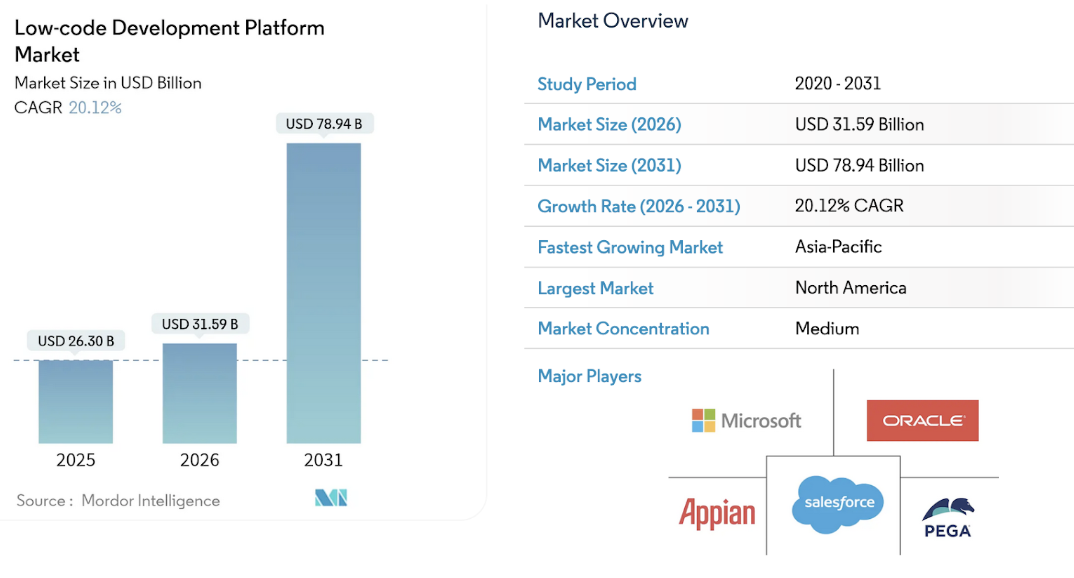 Source: Mordor Intelligence
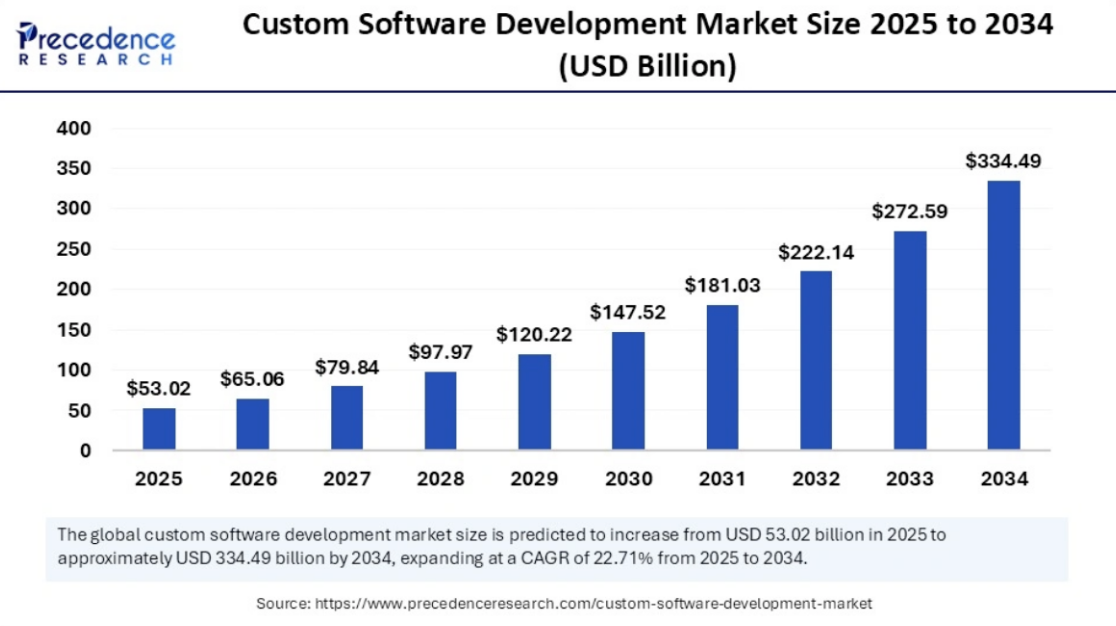 Source: Precedence Research
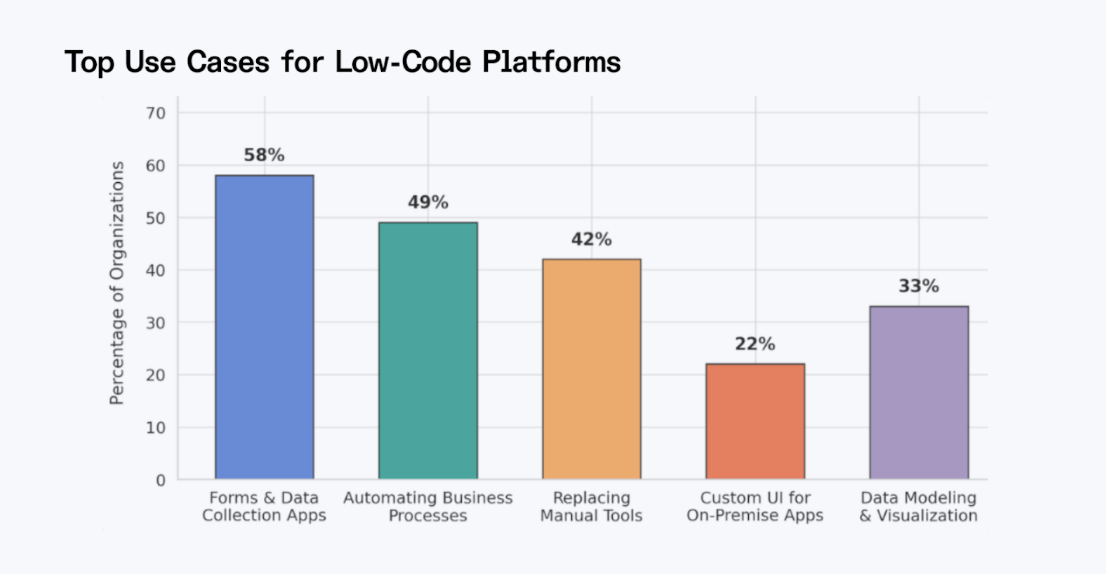 Source: Index
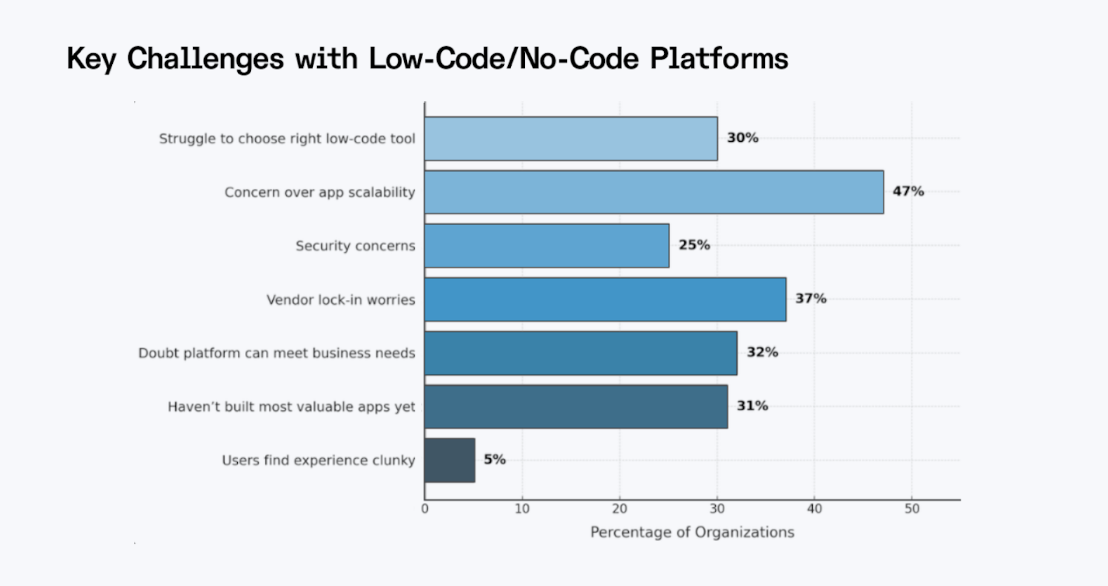 Source: Index

- Low-code accelerates app development for professional developers; no-code empowers non-technical users to build on their own.
- Custom development costs more upfront but offers full control over security, scalability, and integration.
- Hidden costs like vendor lock-in, licensing at scale, and security gaps can erode the savings platforms promise.
- Most successful enterprises use a hybrid approach—matching the right tool to each project’s complexity.
- Technical oversight matters regardless of approach—even no-code projects benefit from experienced technical guidance.
Source: Mordor Intelligence
Understanding the Three Development Approaches
What Is Low-Code Development?
Low-code platforms give professional developers a visual development environment with pre-built components, but still allow them to drop into the code when needed. Think of low-code tools like OutSystems, Mendix, or ServiceNow. The appeal is rapid application development: drag-and-drop features for building user interfaces, reusable components, and built-in connectors for common enterprise systems. Where low-code earns its keep is in scenarios where you need to create applications fast but still want control over custom logic, API integrations, and database structures.What Is No-Code Development?
No-code development platforms take the visual approach further by removing the coding requirement entirely. No-code solutions like Bubble, Webflow, Airtable, and Zapier are designed for non-technical users, like business analysts, product managers, and operations teams, who need to build something without waiting for developer bandwidth. According to Gartner's research, 80% of low-code platform users by 2026 will be outside formal IT departments. That shift speaks to the demand: citizen developers and business teams want to solve problems without filing a ticket and waiting three sprints, often using no-code for process automation and automated workflows. The tradeoff is flexibility. No-code platforms work well for prototypes, internal tools, and simple applications, but they hit real limits when you need advanced customization or complex integrations. Just because no-code is built for people who don't know how to program doesn't mean you can just skip the technical oversight. You still need someone in the room thinking about how the data is organized, how to keep everything secure, and how the new tool is going to play with the rest of your software as it grows. It’s great that an analyst can throw together a working app in an afternoon, but if a tech expert hasn't checked the architecture—things like data flow and who has access to what—that app can easily turn into a liability. Even with no-code, having a professional involved leads to a much better result and keeps you from getting hit with expensive, unexpected problems later on.What Is Custom Development?
Custom development, or traditional software development, means building software from scratch with full control over the architecture, technology stack, and every line of custom code. You write code in the programming languages best suited to the problem. It's the domain of in-house engineering teams or software development partners who design systems tailored to specific requirements. You pick the language, the framework, and the infrastructure. You design the security model, the data architecture, and the integration patterns. The investment is higher upfront, but you own every piece of what you build. And despite the excitement around low-code and no-code, custom development isn't going anywhere. Precedence Research estimates the global custom software development market at $65 billion in 2026, with projections reaching $334 billion by 2034. That growth reflects a straightforward reality: many enterprise problems involve complex processes that are too regulated or too unique for a platform-based approach to handle well. The companies that treat custom development as outdated often end up circling back to it once they hit the ceiling of what their platforms can do.
Source: Precedence Research
The Real Costs: Beyond the Sticker Price
Most decision-makers compare these approaches on initial development cost, and that's where the analysis usually goes sideways. Low-code and no-code platforms typically run on per-user or per-app licensing models. That looks affordable when you're running a pilot with 20 users. But scale that to 2,000 users across multiple departments, and licensing fees can balloon fast. A report from Index.dev notes that companies using low-code solutions avoided hiring two additional developers on average, delivering results with fewer resources and saving roughly $4.4 million in business value over three years. That's compelling, but only if the platform continues to meet your needs over that timeline. Custom development has higher upfront costs, no question. You need architects, developers, QA engineers, and a solid CI/CD pipeline to keep things moving. But you also avoid the recurring licensing fees. Over a three-to-five-year window, the total cost of ownership for a well-built custom application can be lower than a heavily low-coded platform.Hidden Costs Enterprises Often Miss
The costs that really catch teams off guard are the ones that show up later. Vendor lock-in is a big one. Research published by Betty Blocks found that 83% of enterprise data migration projects either fail or exceed their budgets. When your application logic, your data, and your workflows all live inside a proprietary platform, moving away from it means rebuilding, not just migrating. Other hidden costs include performance optimization at scale, security remediation when the platform's built-in controls aren't enough, and custom integration work that essentially negates the speed benefits you signed up for in the first place.Security and Compliance Considerations
This is where the conversation gets serious fast, especially in regulated industries. If you're building for healthcare, financial services, or any sector that deals with sensitive data, the security model isn't something you can figure out after deployment. Low-code and no-code platforms typically operate on a shared responsibility model. The platform provider handles infrastructure security and often holds SOC 2 or ISO 27001 certifications. That covers the basics. But you still have limited control over how data is stored, where it lives, and how encryption is implemented at the application layer. For organizations that need to meet HIPAA, GDPR, or industry-specific regulations, this can become a deal-breaker. Custom development puts you in full control of the security architecture. You design the authentication and authorization models. You decide how data is encrypted at rest and in transit. You can implement zero-trust principles and bake security testing directly into your CI/CD pipeline. That level of control matters when you're answering to auditors and regulators. This is also a relevant consideration when it comes to ethical AI practices in custom software. As more platforms integrate AI features, understanding how those models handle data and comply with regulations becomes part of the security conversation.Scalability and Performance at Enterprise Scale
Low-code and no-code platforms have come a long way in terms of scalability, but there are still practical ceilings. Concurrent user limitations, data volume constraints, and transaction processing caps are real. Most platforms work fine for hundreds of users. When you push into thousands of concurrent sessions with complex data operations, performance degrades in ways that are hard to fix without leaving the platform entirely. Custom-built systems can be designed for the exact load profile you anticipate. Microservices architectures, distributed databases, caching layers, and auto-scaling infrastructure give you the ability to handle enterprise-level traffic without worrying about platform limits. For a deeper look at what goes into this, Kanda has written about the key challenges and solutions in building scalable software products.Integration with Existing Enterprise Systems
Enterprise software doesn't exist in a vacuum. Data integration is a constant challenge—whatever you build needs to connect to the CRM, the ERP, the data warehouse, and probably a handful of legacy systems. Low-code platforms offer pre-built connectors for popular enterprise tools, and if your integration needs are standard, those connectors can save significant time. But when you need seamless integration with proprietary internal systems or legacy databases with unusual schemas, pre-built connectors stop being useful fast. You end up writing custom integration code on top of the platform, which defeats some of the purpose. For enterprises that need to build something like a custom CRM tailored to their specific workflows, custom development allows for direct database access, event-driven architectures, and integration patterns designed specifically for the systems in your stack.Making the Decision: A Practical Framework
So how do you actually choose? It starts with being honest about what you're building and what you need it to do, not just today, but over the next three to five years. Here are some specific situations to help you calibrate.When Low-Code Makes Sense
The low-code approach is a strong fit when you have professional developers who want to move faster on well-defined projects. The sweet spot is applications with predictable requirements and moderate complexity, where the platform's components cover 80% or more of what you need. Think of a financial services firm building an internal loan approval workflow. The process has clear stages, defined roles, and integrates with a standard CRM. A low-code platform can deliver this in weeks rather than months. A retail company rolling out a customer feedback portal with basic reporting can also get to market quickly without tying up the engineering team. IT teams and IT professionals consolidating multiple spreadsheet-based tracking systems into a single application also benefit from this kind of app development, especially when timelines are tight and requirements are well-documented.
Source: Index
When No-Code Works
No-code shines in situations where speed and accessibility matter more than depth, especially when the people closest to the problem don't have traditional coding skills. A marketing team building a campaign tracking dashboard. An operations manager replacing a shared spreadsheet with a scheduling app. A product team validating a new feature concept with real users before committing engineering resources. A human resources department putting together an employee onboarding checklist that routes tasks and collects documents. That said, the "no-code, no problem" mentality has limits. Even in these scenarios, having a technical specialist involved makes a meaningful difference. Someone needs to evaluate how data flows between the no-code tool and the rest of your systems, ensure access controls are properly configured, and plan for what happens when the app outgrows the platform. Without that technical lens, no-code apps can become data silos, security blind spots, or tools that need to be completely rebuilt once they become business-critical. The platform may not require a developer, but the outcome still benefits from one.When Custom Development Is the Move
Custom development becomes the right call when your requirements cross a complexity threshold that platforms simply can't serve. If you find yourself spending more time working around platform limitations than building features, that's a strong signal. Consider a healthcare organization building a patient data platform that must comply with HIPAA, integrate with electronic health records, and handle sensitive data across multiple systems. That level of regulatory and integration complexity requires full control over every layer of the stack. Or a fintech company developing a proprietary risk scoring engine that is central to their competitive advantage, where relying on a shared platform would mean sacrificing a competitive edge by sharing architectural patterns with every other company on the same tool. Or a logistics enterprise that needs a real-time fleet management system processing thousands of concurrent data streams with custom algorithms and hardware integrations no pre-built platform can accommodate. Custom development also remains essential when modernizing legacy systems or creating products that require deep integration with proprietary technologies. As enterprises lean more heavily on AI, IoT, and advanced analytics, the need for tailored architectures designed by skilled engineers isn't shrinking. Platforms can help with some of the surface-level work, but the core systems that run the business still need to be purpose-built.The Hybrid Approach Most Enterprises Actually Use
Most mature enterprises don't pick one approach across the board. They use a mix. The core platform gets custom-built for performance, security, and differentiation. Internal tools, mobile apps, and workflows get handled through low-code. Prototypes and quick experiments get thrown together using visual tools in no-code. The key is having a clear governance model so different approaches don't create silos or security gaps. And regardless of which approach is used for a given project, having technical specialists involved ensures that each tool is applied where it actually fits, not where it's just convenient.Common Pitfalls and How to Avoid Them
Low-Code and No-Code Mistakes
The most common mistake is overestimating what the platform can do. Teams get excited by the speed of early development, commit heavily, and then discover a critical limitation. By that point, they've invested months and significant licensing fees. Other frequent issues include poor governance that leads to shadow IT, skipping security reviews, and not planning for what happens when you outgrow the platform's limits.
Source: Index
Custom Development Mistakes
On the custom side, over-engineering is the classic trap. Building a complex, distributed system for a problem that a simpler tool could have solved is a waste of time and money. Other mistakes include underestimating the true timeline and cost, making poor technology choices that complicate hiring and maintenance, and building custom solutions for problems where a mature off-the-shelf option already exists. That is why partnering with a trusted software developer with a broad portfolio, years of experience and subject matter experts is the only way to win.Low-Code vs. No-Code vs. Custom: At a Glance
How Kanda Can Help
Choosing between low-code, no-code, and custom development involves business strategy, risk assessment, and an honest evaluation of what your team can support long-term. We can help with:- Assessing whether low-code, no-code, or custom development fits your specific business requirements and technical constraints.
- Providing the technical oversight that even no-code and low-code projects need to stay secure, scalable, and well-integrated.
- Designing scalable architectures that are built for your growth trajectory, not just your current workload.
- Building custom software solutions that integrate cleanly with your existing enterprise systems and meet your compliance needs.
- Implementing CI/CD pipelines, security frameworks, and quality assurance processes that keep your product stable as it scales.
- Providing ongoing technical guidance so you're making smart platform decisions at every stage of your roadmap.
Conclusion
There's no single right answer to the low-code vs. no-code vs. custom development question. The right choice depends on the complexity of the project, the maturity of your team, your compliance requirements, and your long-term product strategy. What matters is making the decision deliberately. Assess the total cost of ownership, not just the upfront price tag. Consider security and compliance from day one. Think about where you need to be in three years, not just next quarter. And don't be afraid of a hybrid approach. The most successful enterprises use different tools for different jobs, with clear governance and a coherent architecture underneath.Related Articles

How to Turn Your Broken Data Workflows Into Scalable Data Pipelines: An Ultimate Guide
Key Takeaways Workflows break at scale not because of selecting wrong tools, but because project-level habits, manual handoffs, copy-pasted scripts become the operating model. The architecture patterns that enable scalability: decoupled storage and compute, deliberate data layering, and orchestration treated as a control plane. Pipeline reliability is a delivery problem too. Version control, CI/CD, and…Learn More
Custom AI Development vs Off-the-Shelf Solutions: What Delivers Better ROI?
Key Takeaways Custom AI development costs more upfront but delivers stronger long-term ROI, especially for core business functions. Off-the-shelf tools get you started fast, but subscription costs scale quickly, and vendor lock-in is a real risk. Over 80% of AI projects fail, and the most common reason isn’t the technology, it’s misalignment between the solution…Learn More
Why Using Edge AI for Real-Time Analytics Is Your Next Best Decision
Key Takeaways: Edge AI processes data locally in 1–10 ms, compared to 50–200 ms with cloud-based analytics, making it critical for time-sensitive operations. Organizations can cut data transmission costs by up to 43% and reduce cloud-bound traffic by over 90% by filtering data at the edge. Industries like manufacturing, healthcare, autonomous vehicles, and smart cities…Learn More
Why Human-in-the-Loop AI Is Necessary in the Age of Automation
AI is spreading through businesses much faster than most people anticipated. Data from a Fullview report shows that 78% of organizations now utilize artificial intelligence in at least one part of their operations, which is a significant jump from 55% back in 2023. At the same time, 71% of these companies are regularly using generative AI…Learn More